


This 12-Inch Screen Transformed My F-150. Now It’s Even Better.
There are few phrases more dangerous to a Saturday afternoon than “while you’re in there.”
It begins innocently. You remove one trim panel to replace one component. Then you notice the empty switch location beside it. There is already a wiring connector waiting behind the dashboard. Another modification requires access to the same area. Before long, the center stack is on the workbench, the truck resembles a copper-and-plastic rat’s nest, and a simple update has become a small campaign.
That is precisely how my 2018 Ford F-150 ended up receiving a new control panel, an Auto Start-Stop eliminator, a trailer-brake controller, and a better wireless CarPlay setup in one sitting.
The screen started it all.
An Upgrade With an Asterisk
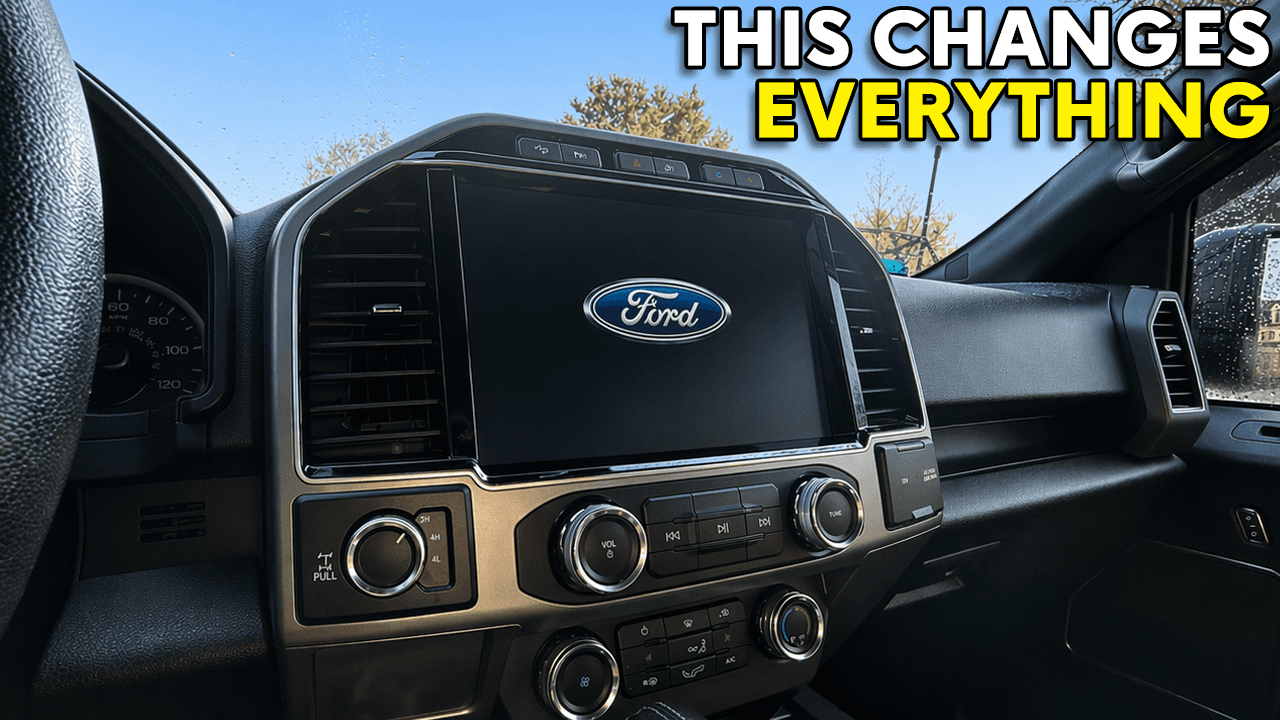
A few months ago, I replaced the F-150’s factory display with CarABC’s 12-inch SYNC 3 screen. I called it a game changer then, and after living with it, I am prepared to double down.
The screen dramatically improves the interior. It retains the familiar Ford interface and factory functions, but presents them on a display that feels appropriate for a modern truck. Passengers notice it almost immediately. More importantly, it does not feel like an aftermarket tablet was simply fastened to the dashboard.
There was, however, one nagging compromise.
The original CarABC panel eliminated the row of physical audio preset buttons from the center stack. The functions remained accessible through the touchscreen, but that was not the point. A good physical button can be found by touch, pressed without taking your eyes off the road, and forgotten just as quickly. Replacing that simple interaction with another screen tap felt like moving backward.
A modification is not much of an upgrade if it requires surrendering useful features.
I mentioned the missing controls in my original review and said I would ask CarABC whether it planned to address them. To the company’s credit, it listened. CarABC developed a revised panel that restores the six preset controls, along with the passenger-airbag indicator that disappeared with the original conversion.
CarABC sent me the updated panel, so it was time to pull the dashboard apart again.
There Are No Shortcuts Behind the Dashboard
From the front, the new panel appears to be an easy swap. Remove a handful of screws, exchange the plastic pieces, and put everything back together.
Naturally, the screws you need are buried beneath everything else.
The screen had to come apart far enough to remove the HVAC controls, audio-control board, and surrounding trim. A small overlapping piece prevented the panel from sliding free, eliminating any hope of performing the swap without fully disassembling the unit.
It was one of those useful garage reminders: sometimes the shortcut takes longer than doing the job correctly.
Once access was gained, the actual exchange was straightforward. Six screws secured the panel. The differences between the two pieces were immediately obvious. The new version had the missing preset buttons and passenger-airbag display integrated into the center section.
The control board went into the new panel, followed by the knobs and HVAC assembly. The delicate ribbon cables connecting the HVAC and audio boards required more care than force. After reinstalling the protective shield, the screen was ready to return to the truck.
But the dashboard was already apart, and those are dangerous circumstances for someone with a box of inexpensive modifications nearby.
Remembering What Ford Forgets
First on the list was Auto Start-Stop.
The factory system defaults to active every time the truck is started. You can turn it off with the dashboard button, but the truck forgets that selection as soon as you shut it down.
Some commonly circulated FORScan methods prevent Auto Start-Stop from functioning by disabling or changing aspects of the Battery Management System. Rather than interfere with how the truck monitors its battery and charging behavior, I chose a plug-in eliminator that works through the factory controls.
The device does not permanently delete the feature. It simply remembers the state of the factory button. Turn Auto Start-Stop off, shut down the truck, and it remains off the next time you start it. If you decide you want the feature back, press the button again.
That was the plan, anyway.
The first eliminator I ordered did not fit this particular switch configuration. My panel has multiple controls in that location, and the cable was intended for a different button arrangement. One Amazon order and one day later, the correct version arrived.
With the proper cable installed, the truck started and the Auto Start-Stop indicator immediately showed the system was off. It is a tiny change, but some of the best modifications are the ones that remove a small irritation from every drive.
The Switch Ford Left Behind
My F-150 also lacked a factory trailer-brake controller. In its place was a small storage cubby that looked as though it was waiting to be replaced by something more useful.
Behind that cubby, Ford had already provided the necessary wiring connector. Removing the pocket, connecting an aftermarket controller, and pressing it into place required only a few minutes.
The physical installation was almost suspiciously simple. The controller will not become functional until the appropriate vehicle configuration is enabled, so that portion will be handled in an upcoming FORScan project. For now, the hardware is installed and waiting.
There is an oddly satisfying finality to an electrical connector clicking into place. With the screen removed, I had enough opportunities to enjoy that sound that it practically became the soundtrack of the project.
When More Capability Creates More Frustration
The 12-inch display also encouraged another experiment: watching video in the truck.
I purchased an ATOTO Android device that adds wireless CarPlay and allows Android applications to run through the infotainment system. In theory, it turns the CarABC screen into something closer to a tablet. Applications can be installed, YouTube can be opened, and videos can be watched while parked.
The idea is appealing. The execution is inconsistent.
The device consumes both USB ports, leaving no convenient connection available for charging. Its version of CarPlay displays only two rows of icons instead of the three shown by Ford’s native interface. Applications can be temperamental, and YouTube sometimes loads only after enough encouragement to make you reconsider whether watching a video was worth the trouble.
It does work, and I keep it in the truck for occasions when I am parked and waiting. But it is not the device I want running every time I drive.
The lesson was simple: I did not really need a miniature Android computer. I needed wireless CarPlay that connected reliably and then disappeared from my attention.
The Simpler Solution Wins
A small, inexpensive wireless CarPlay adapter proved to be the better everyday answer.
Unlike the Android box, the adapter performs one job. It connects my iPhone to the factory CarPlay interface without a cable. The expected three rows of icons return, the interface behaves as though the phone were connected directly, and the adapter occupies only one USB port.
That leaves the second port available for a Lisen MagSafe charger mounted to the air-conditioning vent.
The resulting routine is exactly what I wanted. I get into the truck, place the phone on the magnetic charger, and start driving. The phone charges while wireless CarPlay connects automatically. There is no cable to plug into the phone and no Android interface to negotiate before reaching the features I actually use.
On paper, the Android box is the more capable device. In practice, the simple adapter is better because it creates less friction.
That distinction applies to nearly every successful vehicle modification. The best upgrades do not constantly remind you that they exist. They make the vehicle easier or more enjoyable to use, then quietly become part of the routine.
Finishing What the First Installation Started
With the dashboard reassembled, the CarABC screen looks complete in a way it did not before.
The restored preset buttons bring back the tactile controls that should never have disappeared. The passenger-airbag indicator has returned for owners who missed it. Auto Start-Stop now remembers my preference, the trailer-brake controller occupies its proper factory location, and the wireless CarPlay adapter works alongside the MagSafe charger without consuming every available port.
None of these changes radically transforms the truck on its own. Together, they eliminate nearly every compromise introduced or exposed by the original screen installation.
That is what turns a promising modification into a finished one.
CarABC deserves credit for responding to customer feedback rather than treating the missing buttons as an acceptable tradeoff. The original 12-inch display already made an enormous difference to the F-150’s interior. The revised panel allows the screen to deliver that improvement without asking the owner to give something up in return.
That makes it much easier to call the screen what I called it the first time: a game changer.
The only danger is that the F-150 keeps getting better, and I am running out of reasons to stop taking it apart.
CarABC provided the screen and revised control panel featured in this article. All opinions are my own. Some product links on TSTDRVR.com may be affiliate links, which means the site may receive a small commission from qualifying purchases at no additional cost to you.